Create Comma delimited string from multiple tables in SQL

June 1st, 2012 by admin No comments »

I recently had to create a string of values from a multi table join in sql and I wasn’t sure how to accomplish this so I did some research and came across the SUBSTRING function in SQL server. This function takes a select statement and then the length to begin with and the max length of the string you want to return. I used 1000 just to be safe but my string wouldn’t ever be larger than that. I also used the FOR XML to return the data as xml and pass that to the SUBSTRING fuction for parsing. I have posted the code below, enjoy.

select SUBSTRING((
  SELECT (',' + Table1.Name)
  FROM Table1 join
  Table2 on Table2.SomeID = Table1.SomeID
  FOR XML PATH('')
  ), 2, 1000)

Get Weather Data for your website!!

May 30th, 2012 by admin No comments »

I have been looking at a few options on how to get live weather data for the web and I came across the Weather Underground’s weather API found HERE.  I have posted the code snippet below that will populate the divs with the according weather data using JQuery, I left out my API key for obvious reasons, but you can get a free one my following my link above and registering as a developer, enjoy!

$.ajax({
                url: "http://api.wunderground.com/api/<Your API Key>/geolookup/conditions/q/KY/Murray.json",
                dataType: "jsonp",
                success: function (parsed_json) {
                    $("#tempValue").val(parsed_json['current_observation']['temp_f']);
                    $('#skyCondValue').append($('<option>', { value: "skyCond" }).text(parsed_json['current_observation']['weather']));
                    $('#humidValue').val(parsed_json['current_observation']['dewpoint_f']);
                    $("#windSpeedVal").val(parsed_json['current_observation']['wind_mph']);
                    $("#windDirVal").append($('<option>', { value: "windDir" }).text(parsed_json['current_observation']['wind_dir']));
                    $('#envInfo').text(parsed_json['current_observation']['temp_f'] + " " + parsed_json['current_observation']['weather'] + " " + parsed_json['current_observation']['dewpoint_f'] + " " +
                    parsed_json['current_observation']['wind_mph'] + " " + parsed_json['current_observation']['wind_dir']);
                }
            });

Windows Azure Error: Not running in a hosted service or the Development Fabric.

May 23rd, 2012 by admin No comments »

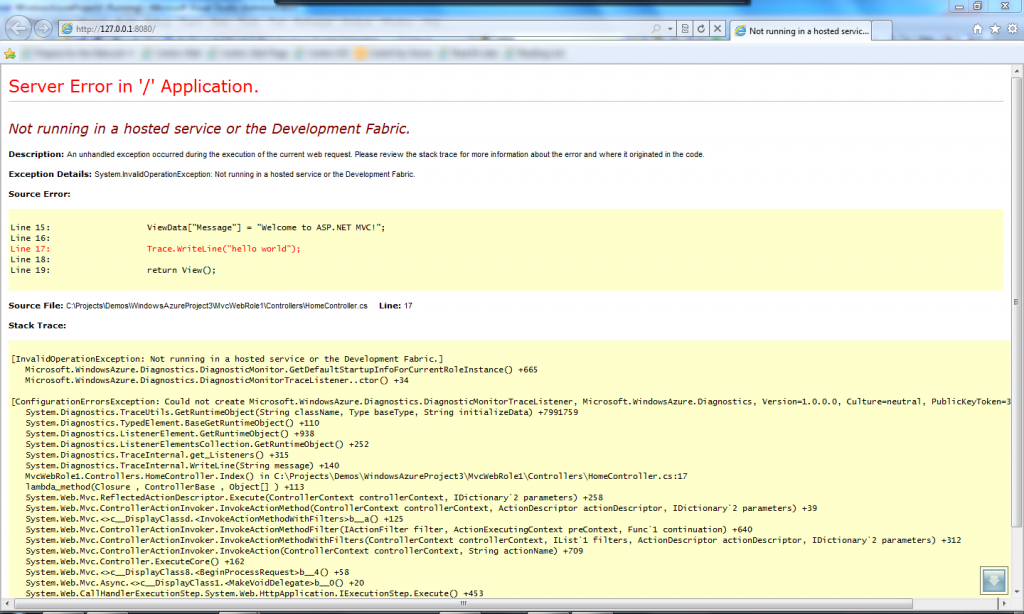
You may get this error sometime when you are trying to launch your azure project out of studio and it will show up in the Yellow Screen of Death or YSOD, here is a screenshot of it.

Basically you will get this error if you either didn’t set your Azure Project as the startup project or you didn’t load Visual Studio under administrative privileges, I hope that this helps.

Windows Azure ServiceBus Demo

May 18th, 2012 by admin No comments »

Recently I was put to task with doing some research on the Windows Azure ServiceBus for an upcoming project at my workplace and I was rather impressed with what I found. I have put a repo out on github for anybody that is interested. I began down the road of something like what is seen on this site: https://www.windowsazure.com/en-us/develop/net/how-to-guides/service-bus-queues/ The problem with following those directions on the link I just sent is that it defaults to some custom port that is not 80 and that wouldn’t work in my situation due to the fact that our app would be out in the public and I didn’t want to burden my clients with having to open up that port on their firewalls, so I went with a REST-based implementation.

The demo has two wpf windows in which you will need to make a couple of changes to work with your azure account, I have a snippet below that shows the spots that need to be changed.

 static string serviceNamespace = "<YourNamespace>";
 static string baseAddress;
 static string token;
 const string issuer = "owner";
 const string key = "<YourKey>";
 const string sbHostName = "servicebus.windows.net";
 const string acsHostName = "accesscontrol.windows.net";

Here is the link to the GitHub repo: https://github.com/eddie1459/WindowsAzure

Enjoy.

How to resolve issues with embedded images in email.

May 10th, 2012 by admin No comments »

I am embedding an image into an email that the server is generating using the SmtpClient in .net and I was having an issue with it caching images in certain situations and then Internet Explorer wouldn’t display the images at all, which is probably a security feature of IE, but the images did show up in Firefox and Chrome. Anyways, here is the code below that will make all of it work correctly in IE and should always show the images correctly, it generates a new Guid to always have a unique image Id so that caching won’t happen and then also tells the client that the ContentType is a jpeg which apparently IE needs to display the image correctly.

Guid contentId = Guid.NewGuid().ToString();

AlternateView htmlView = AlternateView.CreateAlternateViewFromString(
  "This is a sample JPG embedded image<br><img src="cid:" + contentId + "">", 
  null, "text/html");

ContentType ct = new ContentType(MediaTypeNames.Image.Jpeg);

LinkedResource EmbeddedObjects1 = new LinkedResource("PathToImage\image1.jpg", ct);
EmbeddedObjects1.ContentId = contentId;
htmlView.LinkedResources.Add(EmbeddedObjects1);

Setting Input and Selects via JQuery

May 4th, 2012 by admin No comments »

I thought I would post this quick little blurb about setting your HTML controls from JQuery. Here are the 2 lines that set those property types:

$("#id1").val("Your_String");
$('#id2').append($('<option>', { value: "Your_Value" }).text("Your_String");

And here is the complete Ajax call where I am setting those properties off the returned JSON:

function() {
            $.ajax({
                url: "http://www.yourdomain.com/data.json",
		        dataType: "jsonp",
		        success: function(parsed_json) {
			        var location = parsed_json['location']['city'];
                                $("#id1").val("Your_String");
                                $('#id2').append($('<option>', { value: "Your_Value" }).text("Your_String");
			      		        }
	        });
        }

Using jQGrid with ASP MVC controllers

April 24th, 2012 by admin No comments »

I have been toying around with making the JQuery Grid found over on this site http://www.trirand.com/blog/ work with a asp.net controller and I finally got it working after much trials and tribulations, all because of a couple of little gotchas I either didn’t see in the documentation or just overlooked.

Here is the javascript code that will load a jQgrid into your div on your page that uses a plain ActionResult method in a MVC controller that is tagged with the [HttpPost] attribute.

$("#list2").jqGrid({
                url: '/Product/GetProducts',
                datatype: "json",
                jsonReader : { repeatitems: false },
                mtype: 'POST',
                width: 550,
                colNames: ['Name'],
                colModel: [{ name: 'Name', width: 120, align: 'left', editable: true}],
                toppager: true,
                pager: $("#jqTablePager"),
                rowNum: 10,
                rowList: [5, 10, 20, 50],
                sortorder: "desc",
                viewrecords: true,
                multiselect: true
            });

Notice this line ‘jsonReader : { repeatitems: false }’, you seem to need that line if you don’t have an Id column in your data that you are mapping to a column, that was really killing me cause I was just trying to show a simple list of products with a Name property in there.

The other ‘gotcha’ that I had to do a lot of research to finally find out was the way that you have to wrap your JSON in order for the grid to display it correctly. I have included the code below that will return a correct set of JSON assuming you are using a List of some kind of object.

var jsonData = new
            {
                total = products.Count(),
                page = totalPages,
                records = products.Count(),
                rows = (
                    from p in products
                    select new {
                        p.Name
                    }
                ).ToArray()
            };

And then finally here is the HTML that will place the jQgrid and a paging mechanism right below it.

<table id="list2"></table>
<div id="jqTablePager" />
Still Hacked!

April 18th, 2012 by admin No comments »

In my ongoing effort to keep my word press blogs from being hacked and redirecting folks all over those interwebs, I have finally found something that can show you just what is effected in your word press blogs.  Just go to your Dashboard and then to your plugins and ‘Add New’ plugin and do a search for ‘Exploit Scanner’.   This little tool will do a complete scan of your sites php files and will give you a report of the ones that have the potential threat in them too, it also says it will scan your database, although I found I didn’t have any problems in mine.  I found that in my particular situation, the problem was in all the themes I have downloaded in the past, the code in most of those directories was still hacked.  I recommend before you run this file go look thru your wp-content directory and then down in your themes directory and delete any themes you may have in there, it will speed up this search and save you time in your effort to eradicate this problem from your site :).  I hope this helps somebody out there, I know this has been pretty frustrating for me and I guess the plus side to it is that I have learned how WordPress works and a little more about php on the side. I also recommend going to your dashboard and doing a re-install of your current word press install, it will re-enable a lot of things that may or may not work in your admin.

Getting image of GIS map

April 17th, 2012 by admin No comments »

Have you been racking your brain trying to get an image from your map and have just about given up?  I have went through several GIS libraries including OpenLayers, ThinkGEO and some others and finally came across SharpMap which is an open-source .net library that does geo-spatial imagery and it just so happens to have a very nice little Image export routine that does the job and does it simple, here is all the code you need to generate a map from SharpMap:

//code to create Lat and Lon points
var list = new List<KeyValuePair<double, double>>();
 samplePoints.ForEach(delegate(ScoutSample sample)
 {
      list.Add(new KeyValuePair<double, double>(Latitude,Longitude));
});

var layer = new VectorLayer("Field Layer", provider);
layer.Style.Fill = new SolidBrush(Color.Green);
layer.Style.Outline = Pens.Black;
layer.Style.EnableOutline = true;
            
var map = new SharpMap.Map(new Size(250, 250));

//code to add the points
foreach (var pt in points)
{
     //Add a single Point
     var geomColl = new Collection<Geometry>();
     var vLayer = new VectorLayer("GeometryLayer");
     var point = new SharpMap.Geometries.Point(pt.Key, pt.Value);
     geomColl.Add(point);
     vLayer.DataSource = new GeometryProvider(geomColl);
     map.Layers.Add(vLayer);
}

map.Layers.Add(layer);            
map.BackColor = Color.White;
map.ZoomToExtents();
var image = map.GetMap() as Bitmap;

Of course I am not showing you my provider at the moment, I am still fine-tuning the code and I will update this code at a later time, but this is just so easy, just instantiate the map and then call GetMap(), that is how it should be done. There isn’t any methods in OpenLayers that I could see and ThinkGeo has to have a control loaded before you can run the GetMap, which is garbage.

Need a good conference to go to?

April 17th, 2012 by admin No comments »

Are you tired of all these tech conferences where the focus is on the sponsors instead of the content?  I was so I started looking around to see what other conferences were available that focused on the content first and I came across the StrangeLoop conference in St. Louis.  You can visit this conference over at their website at http://www.thestrangeloop.com.  It’s usually in the fall and starts on a Sunday, at least the workshops start on a Sunday if I remember correctly.  I didn’t get to attend the workshops last year cause they sell out so fast, so you had better reserve your spot soon, as the conference sells out rather quickly, even with around 1000 attendees!!  The focus of the conference is web development but there is a rather large functional programming group there.  Coming from a .net background, I had a lot to learn, but I am learning more and more about the web dev world and how things work over in that space.  I highly recommend this conference if you are looking for something very different from the normal conferences.