Are you getting this error when you try to save an Image to your disk somewhere? I was getting this very “Generic” error when I was trying to write a Bitmap out to my hard drive using Windows 7. I was just trying to write it to C:\temp\test.bmp and it was throwing this error up which didn’t tell me a thing. It turns out that the error is masking the real error, which looks to be some kind of permissions error, so if you just change it to either save it to another drive or even another folder, this error should go away. I hope this helps someone else out there struggling with this issue.
Keyboard stops responding in Visual Studio 2010 when editing js files.
April 9th, 2012 by admin No comments »It appears that sometimes when I am editing a javascript file in Visual Studio 2010, the IDE will just stop responding to my keyboard. Thinking it was my keyboard I tried unplugging and re plugging it back in to see if it is a USB issue and that doesn’t fix it. I actually found a bug report to Microsoft located HERE to which there are no solutions provided, just a “We are planning on fixing this in the next version. I will report below some of the things that I have done that have brought the keyboard back for me in case you run into this problem yourself.
1) If I press Ctrl+Shift+Caps Lock+Tab all at once it seems to free it back up for me.
2) CTRL+TAB either once or twice seems to do it as well.
3) Sometimes, closing and re-opening the specific code window I’m working in fixes it.
I hope this fixes this issue for you should you happen to run into this problem.
Publishing apps to Windows Azure from Visual Studio 2010
April 5th, 2012 by admin No comments »I have been tinkering around with Windows Azure using Visual Studio 2010 and I am finding that more and more of the articles you find on the internet are either outdated or just wrong. This is very well likely due to the fact that things have changed over the course of the last year or so with Windows Azure. Here is the steps I took to get my app actually published to Windows Azure, hope it helps.
I am not going to go into the creation of the app, just the publish part of it, there are tons of examples out there that go into details of how to create your app and there are several example apps you can download as well. You have to make sure you have a Windows Azure account of course to go through this tutorial I have here as well, again, pretty self-explanatory.
The first thing to do is open your project in Visual Studio 2010 and right click on your Azure Project and click on Publish:
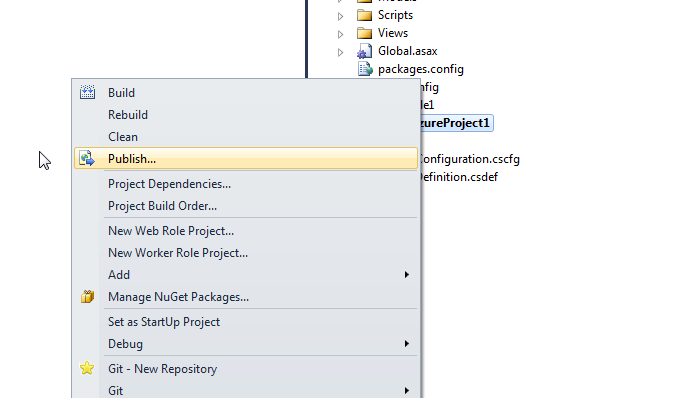
The next step you will see a screen like this:

You will need to create a Certificate by dropping down the Credentials dropdown and then hitting “New”, that will bring up a screen like this:

You can make your certificate in this screen and then use the “Copy the full path” link there to get it copied to the clipboard and then you will also need to get your subscription ID from the Windows Azure portal, you can find that under “Hosted Services” under the right hand pane in the “Subscription ID” box. When you get that created, you can click on ok and you are almost ready to publish your app to azure.
Before you click OK on the next screen, over in your Azure portal, you need to make sure to upload your certificate to Windows Azure so that your app will be authenticated with the server. In the azure portal, locate the “Management Certificates” under “Hosted Services, Storage Accounts and CDN”, click on that and you will see something like this below.
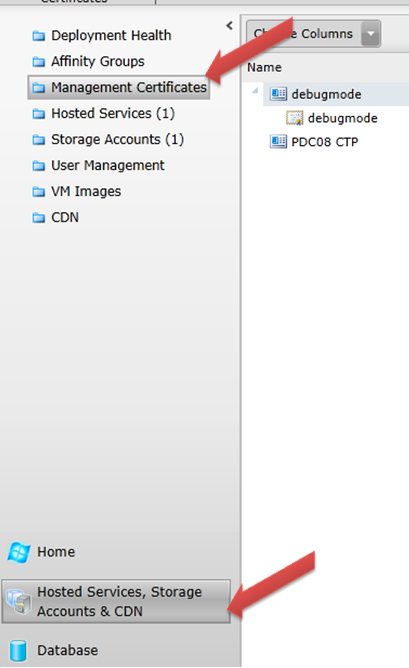
Then just click on the “Add Certificate” button

and you will see a screen like this one:

Your subscription will have been chosen assuming you have already taken care of all of that before by signing up for azure, you then click on the Browse button and then paste in your directory, you will probably have to clear out the certificate key filename to allow you to open the directory to choose the file, then ok that and then ok this screen and you will have your app authorized for azure.
Finally you can go back to studio and click on your ok button to publish your app to azure, it does take a while and the progress of the publish will show up in the lower section of studio in the activity log.

Researching Windows Azure Apps
April 2nd, 2012 by admin No comments »I am doing some research on writing applications on Windows Azure, or Microsoft’s new cloud based computing solution. I am finding that most of the “Tools and SDK links” they provide me were not the correct files that I needed to get my example projects to work correctly. Here is the link that I found that correctly gets the libraries installed that you need. http://www.microsoft.com/download/en/details.aspx?id=15658
You have to install both the VSCloudService.exe and the appropriate WindowsAzureSDK for your environment.
Backbone.js and jQuery Mobile with template
March 29th, 2012 by admin No comments »I have been doing a lot of research in my spare time with Javascript apps and I feel like I have a decent understanding of the Backbone.js framework and I recently tried to give it a front end using the jQuery Mobile framework. Well, that turned out to be quite the challenge to get it to render it to the browser the way it was supposed to look. Take the Backbone.js View below for instance:
var CommentsTable = Backbone.View.extend({
        el: $("#comments"),

        initialize : function(){
            _.bindAll(this, 'refreshed', 'addRow', 'deleted');
            this.template =  _.template($("#entry-template").html());
            Comments.bind("reset", this.refreshed);
            Comments.bind("add", this.addRow);
            Comments.bind("remove", this.deleted);
        },

        // Prepends an entry row
        addRow : function(comment){
            var view = new EntryView({model: comment});
            var rendered = view.render().el;
            $("#commentList").append(rendered);
        },

        // Renders all comments into the table
        refreshed : function(){
            // reset the table
            $("#comments").html("<ul class='ui-listview ui-listview-inset ui-corner-all ui-shadow' id='commentList' data-role='listview' data-inset= 'true'></ul>");
            if(Comments.length > 0){
                // add each element
                Comments.each(this.addRow)
            }
        },

        // A comment has been deleted, so we rerender the table,
        // because this update could also come from another user via the
        // _changes feed
        deleted : function(){
            this.refreshed();
        }

    });
On line 22 you will notice that I have hard-coded the actual CSS styling for the jQuery Mobile listview, I have tried every sort of method I could think of to get this work and the only way I could get it to work was to actually put the listview in there with it’s styling, here is the template I am using as well:
<script type="text/template" id="entry-template">
            <div class="ui-btn-inner ui-li"><div class="ui-btn-text">
                <a href="#page1" data-transition="slide" class="ui-link-inherit">
                    {{name}}
                </a>
            </div><span class="ui-icon ui-icon-arrow-r ui-icon-shadow"></span></div>
        </script>
I have more hard-coded styling in there to make it work correctly. So far this is the only way I can get it work correctly, it totally goes against how its recommended but it is working for me. If you have any suggestions, I am completely open as I am just learning this stuff myself.
Converting Array of Guids to a List
March 21st, 2012 by admin
No comments »
I have been doing more web work these days and on a recent project I was working on I had a need to convert an incoming string of guids to a List<Guid> for usage over in our repositories. Well, my first thought to get the string to be split up into an Array[] of strings was to just call the Split() function in .net, and that will do the job if all you are wanting is an Array[] of strings. it would look something like this:
request.Headers[“ids”].Split(‘,’).ToArray()
The problem was when I tried to get .net to cast that over to a List using Cast or ToList(), it won’t convert this although you would think it would be smart enough to convert an array of strings that are Guids to a List that is Guids, but whatever. This is where the ConvertAll() method on the Array class comes into play, it is in the .net 4 libarary so make sure you are on the right version. The ConvertAll() will convert an array of one type to an array of another type, so I have updated my code to look like so:
Ids = Array.ConvertAll(request.Headers[“ids”].Split(‘,’).ToArray(), Guid.Parse).ToList();
Hope this helps somebody :).
Draggable WPF Controls
March 19th, 2012 by admin No comments »I have a project where I needed to have WPF controls placed on a canvas and those controls have the ability to be dragged or positioned around on the screen somewhere. I was using some custom logic I had written to draw rectangles and textboxes to the canvas and just watching the mouse events but that was a hack because sometimes the text would get too big to fit in the textboxes. I came across this blog post and Josh Smith has a nice little DragCanvas class that wraps up all this functionality very nicely, all you have to do is put the controls in the Xaml and you are set, very nice job Josh!
http://www.codeproject.com/Articles/15354/Dragging-Elements-in-a-Canvas
This is nice for me because I wanted to display data in a grid and have headers and be able to drag those grids around the screen. It also allows you to do other things like set transparencies on those controls and hide and show them as well.
Windows 8 Apps, should I write in XAML or HTML5??
March 12th, 2012 by admin No comments »I have been recently doing some research into Javascript and, coming from a .net background, I must admit is a bit daunting due to just my lack of knowledge really. I have been pondering what road I should stay focused on continuing forward to work on apps to be targeted for future versions of Windows, in particular, Windows 8.
I guess this article should be called, “Is it worth it to learn HTML5 or just stick to what I know in the .Net world?” I think the answer is pretty simple, I should absolutely continue on and learn all I can about writing apps in HTML5. I honestly think in the future that “Metro” apps that are written in XAML will only have a very limited market, obviously, cause they are targeted for Windows machines only. On the other hand, I could write a HTML5 app and it will work virtually work anywhere, that makes too much sense if you ask me. I also have some years invested in writing WPF/XAML apps so if I am tasked in writing an app in C#/WPF, it won’t be a big deal, I already have those skills, sure I may have to learn a few new libraries, but no big deal.
Javascript has came a long way since I last looked at it several years ago, there are full blown libraries like Backbone.js, that allow you to do MVC programming. There are literally thousands of libraries to do just about anything you want, with full source to change it however you want. I don’t want to come across at a Microsoft hater in this post, just posing a question that seems to make too much sense to me.
I am not talking about writing a Javascript app using the WinJS library, which, once again, would tie you to a windows app, I am talking about a full-blown HTML5 app written outside of Visual Studio, so you are sure to not be depending on any kind of Microsoft library. This whole paradigm is nothing new, I think I am just now getting around to embracing it because its pretty easy to see where things are going, and I think Microsoft is getting behind in this area. Even still, it never hurts to learn a whole new programming language, and while Javascript is not new to me, I have never taken the time to really learn it and now that there are so many libraries available and it has gotten very powerful, I think its time I gave it a harder look, what are your thoughts?
.Net Developers are a bunch of whiners!!!
March 6th, 2012 by admin No comments »I don’t know if you have seen Visual Studio 2011 or not yet, here is a screenshot of the solution explorer compared to how it used to look: 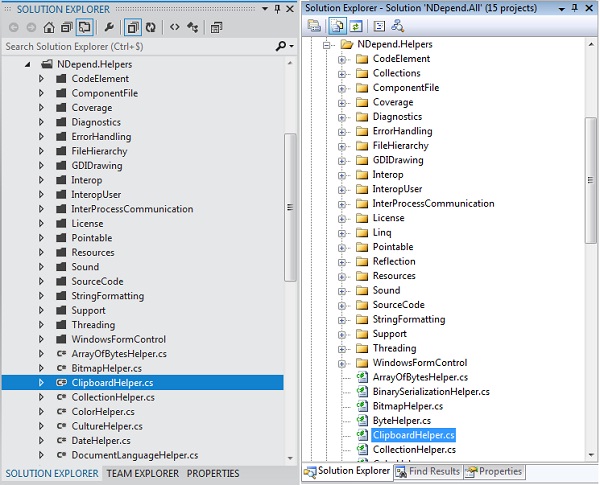 I personally do not care about how my tools look, but apparently the entire .Net development community cares more about how their tools look than how their tools actually function. Don’t believe me?
Look at these links: http://bit.ly/y6akQ8
http://bit.ly/wsDT2q
http://bit.ly/zvj23C
There are lots more ranting and raving going on, with more and more coming on everyday. I think Microsoft is simply moving towards what other desktop applications such as Photoshop and Lightroom are doing with darker themes and the same colors to keep the IDE in the background and allow you to focus more on your actual application, you know, what you are getting paid to build?? Sure some are focusing on the improvements, but to me, its pretty telling about a development community when what your IDE looks like is more important that the actual features or actual code you can write.
I HAVE BEEN HACKED!!!
March 2nd, 2012 by admin No comments »I run another wordpress blog over at http://www.mayfieldcardinals.net and lo and behold, it was finally hacked with a redirect script that would send any of my visitors over to porn sites or other places of malwareness. Well, I am providing this post to help anybody else that runs a wordpress site and runs into a similar situation.
The first thing you should do in all situations with a site that has been hacked is CHANGE YOUR PASSWORDS. Change every password you can think of, the ftp one, the word press admin one, the mysql passwords, all of it., chances are the originator of the script has stored that password somewhere and if you clean your files they will be right back in there in no time. Remember if you are running a WordPress site, you should change your password located in the wp-config.php file, the line will look something like this:
/** MySQL database password */
define(‘DB_PASSWORD’, ‘password’);
That password has to coincide with the one in your MySQL db.
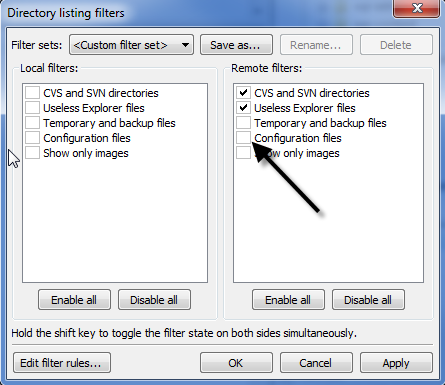
Make sure that your FTP client can show all the files that are in your site, I use FileZilla and you have to enable it to show the configuration files in your ftp server. In filezilla, just got to View->Filename Filters… and then make sure that Configuation Files is unchecked on the right. It is possible that the hacker messed with your .htaccess file and you won’t be able to mess with it unless you have this enabled.
In my particular situation, I had some index.php files modified with a Base64 encoded piece of php inserted, if you have been hacked, you more than likely have this at the top of your index.php files, or something very similar:
<?php/**/eval(base64_decode(“aWYoZnVuY3Rpb25fZXhpc3RzKCdvYl9zdGFydC…
I have left out the bulk of it to keep this post cleaner. I also had this script at the top of my wp-config.php file as well. I copied and pasted that script over on this site: http://www.opinionatedgeek.com/dotnet/tools/base64decode/ and noticed that it has a lot of redirects to a site called lolypopholypop’dot’com and lilypophilypop’dot’com and all I simply had to do was remove that script and all was good.