Adobe Acrobat (PDF) files not displaying correctly on iPad?

October 30th, 2012 by admin No comments »

I have been working on an adobe acrobat export routine on the web that uses ComponentOne’s Active Reports tool to generate the files and I ran into a bit of a snag when trying to display the files on the iPad. I have posted the code below:

HttpResponseMessage message = null;
var pdfExport = new PdfExport();
var m_stream = new System.IO.MemoryStream();

var rpt = new YourActiveReport();
rpt.Run();

pdfExport.Export(rpt.Document, m_stream);
m_stream.Position = 0;
message = Request.CreateResponse(HttpStatusCode.OK);
message.Content = new StreamContent(m_stream);

message.Content.Headers.Add("Content-Disposition", "attachment; filename=yourreportname.pdf");
//this is the magic line
message.Content.Headers.ContentType = new MediaTypeHeaderValue("application/pdf");
return message;

I put a comment on the line that looks like this:
message.Content.Headers.ContentType = new MediaTypeHeaderValue(“application/pdf”);
I didn’t have that line in before and it will work just fine on standard machines like your desktop in your browser but since the ipad either doesn’t allow plugins inside safari or doesn’t know how to handle attachments the pdf was coming back as garbage, basically displaying the raw postscript in the browser, that wasn’t cool. All you have to do is add that line in and all is well, I hope this helps someone.
Validate Subcollections in Backbone models

October 26th, 2012 by admin No comments »

Backbone.js is an awesome library for Javascript development, and at some point in your application, probably close to the finishing point, you will want to validate your models and Backbone has provided a great function through that, find out more about that here: http://backbonejs.org/#Model-validate. As I was adding validation to my models I had the need to validate my subcollections that were in my models and I just didn’t see a good way to do that besides sending up my subcollections via the posts or the save() method in backbone, which I don’t want to be doing until my main model is ready to be sent up.

I know its wrong or bad coding to be adding unvalidated models to your collections but in my situation it was necessary so I came up with a little method of validating those models, check out the snippet below:

validate: function (attrs) {
           if (attrs.Products.length == 0) {
                return "Please choose at least one product";
            } else {
                var error;
                var that = this;
                attrs.Products.each(function (prod) {
                    error = prod.validate(prod.attributes);
                });
                if (error)
                    return error;
            }
}

As you can see in the validate function of the main model it simply iterates over each ‘Product’ in the Products collection and calls validate on those products and if an error is thrown down in the product model it will bubble up to my main model and thus show the user the error. Its a simple solution that I kind of expected backbone to be able to handle for me but everybody out there just says to validate your model before it goes into the collection but there are situations where that just isn’t possible. I hope this helps someone out, have a great day!!

How to add a fixed header to your Twitter Bootstrap Table

October 23rd, 2012 by admin No comments »

The table styling in bootstrap is very nice, the biggest benefit being that it is responsive and works on all devices, all you have to do to make the columns disappear is to put a class of “hidden-phone” on the columns you want to hide.  I have using it to death in my application I have been working on and I have noticed on large sets of data, especially data that has to scroll down, you lose the headers after it overflows past your div.  For me this was unacceptable because your user will lose the context of the data and will not understand what the columns hold.  I did some searching and came across this jQuery plugin that will basically take the table header you have and make a copy of it and lay it on top of your bootstrap header, here is a link to the plugin:https://gist.github.com/2948136.  I have the basic layout of your html that will make use of this below:

<div class="fixed-table">
    <div class="table-content"> 
        <table id="tableId" class="table table-fixed-header">
            <thead class="header">
            <tr>
                <th>Your Header</th>
            </tr>
            </thead>
            <tr>
                    <td>Your Data</td>
                </tr>
        </table>
    </div>
</div>

You will need the css as it does some nice styling for you but I don’t think its necessary, it would be nice down the road if this just becomes a class you can tack on to your html and it will do this work for you. Here is simply how you create the fixed header: $(‘.table-fixed-header’).fixedHeader();

Twitter Modal on the phone? No problem!!

October 19th, 2012 by admin No comments »

I have been using Bootstrap sometime now, we love it so much at our company that we have decided to use for our web app.  Recently I used it to format the tables in our app and due the responsive nature of bootstrap it just naturally works, here is a link to their base component so you can see it in action: http://twitter.github.com/bootstrap/base-css.html#tables.  You can hide and show the columns by simply tagging you elements or divs with a class of ‘hidden-phone’  or ‘visible-phone’ respectively.  That was a big win for us due to the responsive nature of  bootstrap, now for my main issue.

In the mobile version of the site I wanted to pop up a bootstrap modal window and allow the user to fill out some fields, here is the link to the modal examples http://twitter.github.com/bootstrap/javascript.html#modals.    This works exactly as expected minus one little gotcha, the body of the modal, if greater than 400px I believe, will go past the bottom of the screen on a phone, particularly the iPhone, thus leaving the user stranded with a screen they can’t close.  In comes the  Modal Responsive Fix which was written by Nifty Lettuce, which I have no affiliation with but I am so thankful for this JQuery plugin cause it really saved my bacon with this.  Here is the link to his fix: http://niftylettuce.github.com/twitter-bootstrap-jquery-plugins/, I will let you look over there for how to get it and set it up with your app.

How to make a collapsible HTML table using jQuery

October 15th, 2012 by admin No comments »

I didn’t realize it, but when you are using an HTML table apparently anything inside your <Table> tags have to be either in a <tr> or <td>, it just simply ignores things like divs, so this didn’t allow me to just use the accordion collapsing goodness that Twitter’s bootstrap provides for me, so I had to come up with a way to get that work with tables, so here is the method that works.  First you start off with a simple table like so:

<table id="collapsibleTable">
            <thead>
            <tr>
                <th>Your Heading</th>
            </tr>
            </thead>
            <tr>
            <td>
               <label>Label to Show</label>
               <input id="yourId"></input>
               </td>
            </tr>
        </table>

Notice the label in the <td> item, this is a holder for the information when you aren’t clicked on the row of the table, below I have posted in the Javascript that does the magic using Jquery:

refreshTable: function (element) {
                $('#collapsibleTable').find('label').show();
                $('#collapsibleTable').find('div').hide();
                $('#collapsibleTable').find('input').hide();
                $('#collapsibleTable').find('select').hide();

                $(element).find('input').show();
                $(element).find('div').show();
                $(element).find('select').show();
                $(element).find('label').hide();
            }

As you can see, I use the find() method in JQuery to locate any inputs or labels or divs or even selects in the table and either hide or show them, depending on where you are in the table.  This is a bit of a hack, but it does work, it doesn’t provide the nice transition that bootstrap’s accordion does, but its is a nice way to keep your tables clean, I hope this helps someone, thanks.

How to add music to your iPhone/iPod in the newest version of iTunes (10.7.0.21)

October 10th, 2012 by admin No comments »

It seems like each time I update iTunes I have some kind of issue adding my music to my phone so I thought I would share my experience with you and explain how its done, or at least the way I found to work with the latest version of iTunes.

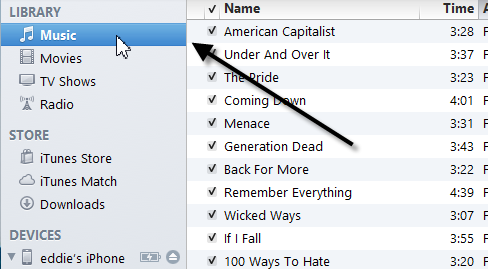
1)  First drag your music to the Music section in the library:

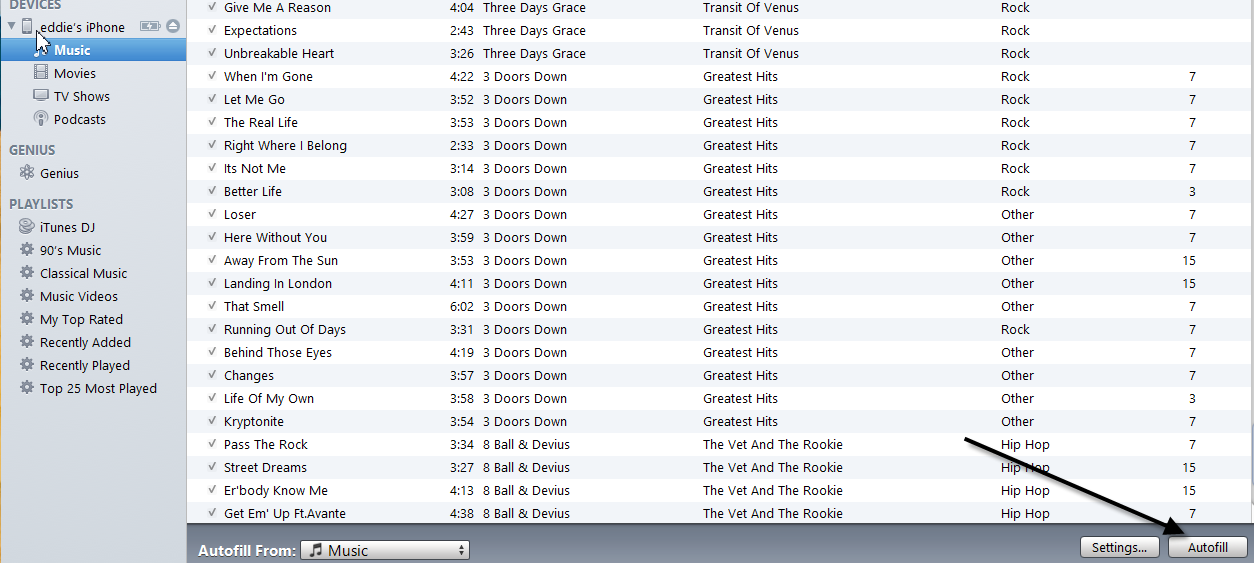
2) When you have that done, simply click the “AutoFill” button in the bottom right hand corner and your music will be put on your phone for your listening pleasure. I hope this helps someone.

Beware of outdated code!!!

October 8th, 2012 by admin No comments »

I have been working with Twitter Bootstrap with a project at work and I recently ran into a bit of a problem and I was beating my head into a wall about it and I wanted to share my findings.  If you are ever dealing with an open-source library like Bootstrap, make sure you are working with the latest examples and the latest build of the tool.  I was following an example I found online and down in the <a> tag they had this: parent=’#accordion2′ and that was fine for the older version of Bootstrap but the new version needs this: data-parent=’#accordion2′.  I beat my head against the wall for about an hour trying to figure that one out before I realized I was dealing with an older example.  I hope this helps someone, thanks.

StrangeLoop conference 2012

September 26th, 2012 by admin No comments »

This week was the strangeloop conference and I thought I would share some things I have learned from the conference.

I attended this conference last year and it was quite interesting, so I decided to attend again this year and I was not disappointed.  If you are a software developer and you love to learn new bleeding-edge tools in the open source world, mixed with computer science theory, this is the conference for you.  I will highlight some of the more interesting points that I took away from the conference.

Google has a TON of irons in the fire at the moment, they have become my company to follow.  You may be familar with the V8 engine they are working on, which is basically their way of speeding up the javascript engine, you can learn more about it here: http://code.google.com/p/v8/.  Its all open source so if you are feeling froggy, you can contribute to the project.  Lars Bak, one of the senior engineers with google announced their work on Dart, which is basically a replacement for the javascript engine, which is gaining lots of traction in the software world since it too is an open source project, you can find out more about that here: http://en.wikipedia.org/wiki/Dart_(programming_language).

Google also had a talk about their new Go programming language, which was a very interesting language indeed.  It spawned from the need within google to have a single language for all the engineers to use and that was very flexible and extensible for their internal needs, you can find out more about that here: http://golang.org/.

Google also spoke a lot about how they are trying to make the web faster with their ‘Lets Make the Web Faster’ movement.  There was a lot of talk about the SPDY protocol, which you can learn more about here: http://dev.chromium.org/spdy/spdy-whitepaper.

Those are the big highlights I saw from Google, I will be posting in the weeks to come about some other things I think are cool in the new Chromium, or the Canary version of Chrome as I have it now and I am playing with it on my machine.

Thats all I feel like writing at the moment, I will update my blog in the days and weeks to come with more cool information.

A very nice tool to display drop down data on your website

September 18th, 2012 by admin No comments »

I had a requirement on a project I have been working on to provide a search tool that can look up live data and filter it based on what you type through an auto-complete function.  I have been through 3 iterations, here is what I have used to this point:

The first one I used was the JQuery ComboGrid found HERE.  This tool was a good first run, it provides auto-complete and will display a grid that attaches to your INPUT element and allows you to display columns of data and will populate the field with whatever you select.  The problems I had with it is that it doesn’t look at all on an IPad and formatting it was somewhat of a nightmare, so I had to ditch this one.

Then I came across the Chosen control found HERE.  This control was a better step in that it does a very good job of formatting a SELECT element with auto-complete and filtering of the results.  The problems I ran into with this control was that it does some weird things on the IPad and it had no native function to hook into live data on a server, so I had to continue my search.

I have finally landed on the Select2 control, found HERE, so far this control does everything I need, it provides an ajax: function that allows you to hook right into your web call and even provides hooks for formatting the results and CSS file inclusion.   A word of advice if you are using the ajax: function, make sure you are using an INPUT element instead of SELECT and that your results include a lowercase id and text property, the control uses the id for searching, and the text property to display the results.  Happy coding!!

LESS CSS Error “Cannot call method ‘charAt’ of undefined”

September 11th, 2012 by admin No comments »

If you are writing .LESS files for your CSS you will probably run into this error at some point, especially if you are using multiple less files through its @import function.  This file really means that somewhere, probably buried down inside the less files you are importing has a problem.  The way I have found to fix this issue is to comment out your @import line and then run again and see if it tells you anything.  I found that by doing this it pointed me exactly where I needed to go and I was able to fix my issue and continue on, hope this helps.