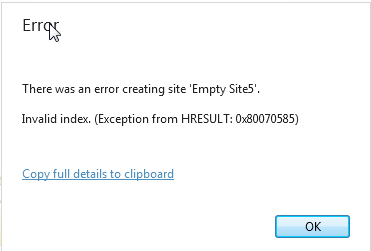
I didn’t really want to install the webmatrix2 product from Microsoft but I wanted the iphone and ipad simulator cause if you are like me, you don’t have a few hundred bones laying around to buy an ipad. So I learned from the company that made the simulator that they have put it on the gallery for install with webmatrix, fine, you can read about that here: http://www.electricplum.com/. All I wanted was the simulator but I can’t get that unless I download the matrix tool, which I did and after a reboot I fired up webmatrix and found that I cannot get the tool until I create a site in the tool and then go into that gallery to get the tool, certainly a lot of hoops if you ask me just to get a tool, but I wanted the tool, so I tried to create a site. When I try to create any site with webmatrix I get this error:

Every blog or forum I have seen online is telling me to reinstall IIS and WebMatrix, which I do not really want to do at the moment cause I am in the middle of Azure development and I don’t want to mess my environment up, not to mention I really didn’t want this tool to begin with.
WebMatrix 2 Beta is pretty busted…
August 16th, 2012 by admin No comments »JQuery lesson for the day.
August 15th, 2012 by admin No comments »Have you ever been deeply nested in some html and need to call out to a parent nested way up many more levels? Well, typically in jQuery you would have had to do something like this $(“#selector).parent().parent()…etc. Well, I thought I would share an interesting little function I found today, the parents() function, I have an example below.
$("#selector").parents("#selectorToFind");
As you can see, all you have to do is feed it the selector, “selectorToFind” and it will traverse up the tree and find the element that I am looking for.
Twitter Bootstrap Collapse not working correctly
August 14th, 2012 by admin No comments »The app I have been working on has a stackable list view that I have been very pleased with but I notice that you had to click on any item twice to get it work correctly. I was following a tutorial from the guys on the Bootstrap team and they said that you needed to include the collapse plugin to get the functionality I was looking for. After further research I realized that the main bootstrap file that I am using (2.0.0) has the collapse already included in it along with everything else. All I had to do to make it work correctly was to remove the extra library and everything works fine, I hope this helps anybody that is struggling with this issue.
Twitter Bootstrap not displaying correctly on mobile devices
August 10th, 2012 by admin No comments »I have been working on a HTML5/Javascript mobile/desktop application using Twitter’s new bootstrap CSS library found here. Everything was going along just fine until I tried to view my site on mobile devices, where it didn’t do the formatting I expected it to like Jquery Mobile would do, so I started scratching my head trying to figure out why it wasn’t rendering like it should, then I came across the meta tags for the html. All I had to add was this line:
<meta name="viewport" content="width=device-width, initial-scale=1.0">
And it renders just like I wanted it to, I would have never thought it would be that simple, but it is. I am really starting to like this library, I will keep you updated at time goes on.
Should I write in CoffeeScript instead of Javascript?
August 8th, 2012 by admin No comments »I have been writing a lot of javascript at my current job lately because we have been working on a single page client app that is heavy on the client, thus the need for javascript. Here lately the buzz is all about CoffeeScript and how its just the greatest thing since sliced bread for Javascript developers. I have inserted an image below that basically shows the difference in js (Javascript) vs. cs (CoffeeScript).

As you can see, CoffeeScript is a lot less wordy, but is that a good thing? Is it good to remove all the wordiness in favor of some whitespace? I think there is an argument for both honestly and this video is a pretty impressive example of how much code you can reduce if you use coffeescript: http://ryanflorence.com/2012/javascript-coffeescript-rewrite/. I think what it truly boils down to is your staff, if your whole staff can agree on using coffeescript then I say go for it.
There is also the argument that if you just write coffeescript you lose the ability to understand javascript cause you are letting CS do all the work for you, which may be a decent argument but not as strong as keeping your developers on the same codebase. I work in a predominantly C# house, we wouldn’t hear of mixing VB.net into that picture, it would cause a lot of confusion amongst developers, especially when it come time to fix bugs. I hope I have confused you as much as I have myself, lol, I would love to hear arguments for/against the use of Coffeescript, the code-reductions it provides definitely has my head turning.
Dynamically assign class name to HTML in asp.net razor syntax
August 1st, 2012 by admin No comments »IF you are struggling with getting your html formatted correctly in asp.net like I am here is a little tip I found to set your html based on css classes you have in your css file.
@Html.CheckBoxFor(x => data.Selected, new { @class = "checkbox" })
I tried just wrapping the asp syntax in a div and that didn’t give me the results that I was looking for and besides, this syntax is a lot cleaner. There are other HTML options in the razor syntax but I couldn’t locate a good list anywhere, if you know of one, don’t hesitate to leave me a message and I will get this post updated with that information, thanks.
Asp.net site creating new IP address with Windows Azure
July 25th, 2012 by admin No comments »If you have a windows azure project that launches a asp.net site and you are running on IIS Express and for some reason it is incrementing the IP address up another number, I have the solution for you. According to Microsoft here is how they assign IP addresses:
“Web role deployments are allocated different increasing IP addresses, starting with get 127.0.0.1, while trying to maintain the port specified in the service definition file. If the service definition file defines two web role deployments and specifies that they use port 8081, the compute emulator would attempt to assign 127.0.0.1:8081 and 127.0.0.2:8081 as the endpoints.
If the port specified in the service definition is in use, then compute emulator tries to allocate an alternate port by monotonically increasing the given port number until one is available. In case of port ranges, the compute emulator tries to allocate a range within which there’s at least one port available.
For example, if port 80 is specified in service definition and is in use by another process, but port 81 is free, the web role deployment is allocated 127.0.0.1:81. The compute emulator will issue a warning that the port in use and unavailable to be allocated as defined in the service definition. The warning appears on the console through CSRUN.exe tool, and in the “Output” window” (“View”->”Output”) for Visual Studio users.”
Microsoft seems to be saying that the emulator handles this for you, mine seemed to not, so all I had to do was stop and start the windows azure emulators and all was good.
SEHException (0x80004005): External component has thrown an exception.
July 20th, 2012 by admin No comments »If you get this error with your Azure Cloud project, try this simple fix: Right click on your cloud project and then choose properties and then choose the Web tab and then if you have it set to “Use IIS Web Server”, switch that to “Use IIS Express” and that could possibly fix this issue for you, it worked for me.
Need an easy and clean way to export your asp.net data to Excel?
July 18th, 2012 by admin No comments »If you are doing any research on how to get data contained in asp.net pages out to excel, the first path you may take, like i did was to set the Response, something like this:
Response.ContentType = “application/vnd.ms-excel”;
Response.AddHeader(“content-disposition”,”attachment; filename=BizImportReport.xls”);
Well, this was producing for me an excel file with all of the response in it which included the entire webpage, and no matter how many different ways I tried to get the data into some kind of form that would export well, it never worked, until I came across a little library that does exactly what I want in a couple lines of code, so it looks something like this:
var objExport = new Export(“Web”);
if (DS.Tables[0].Rows.Count > 0)
objExport.ExportDetails(DS.Tables[0], Export.ExportFormat.Excel, “yourexcelfile.xls”);
Here is the link to this library, enjoy Excel Export Library
Google Chrome caches “Like a Boss”
July 18th, 2012 by admin No comments »If you do much web development at some point with google chrome you will notice that it is notorious for caching your web pages, which is very frustrating to a web developer when you want to see your changes. I came across some settings that you can stick in the startup link that will set chrome to never use any cache.
–disk-cache-dir
and
–disk-cache-size
are the parameters…
Simply close Chrome, right-click your Chrome shortcut, click Properties, and then in the field labeled “Target:”, make it look something like this:
“…chrome.exe” –disk-cache-dir=”CACHE_DIR” –disk-cache-size=N
Where ‘CACHE_DIR’ is the new cache location, and ‘N’ is the cache size limit, in bytes.
Here is what mine looks like: C:\Users\eddie\AppData\Local\Google\Chrome\Application\chrome.exe –disk-cache-dir=”C:\temp” –disk-cache-size=0